Floral Family Monogram Home Round Sign: A Practical Guide to Digital Decor
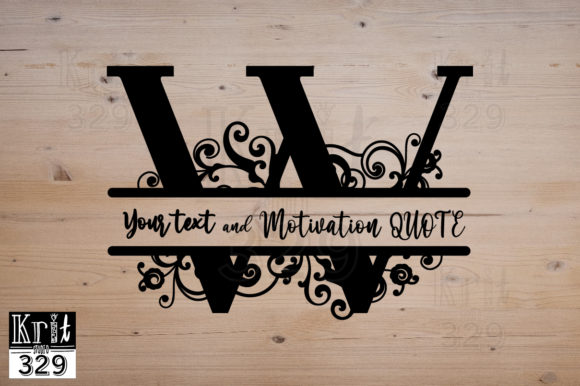
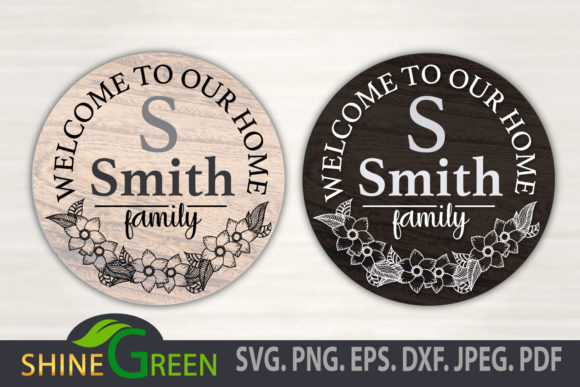
Creating a warm, personalized entryway often starts with the right signage, and the Floral Family Monogram Home Round Sign has become a staple for seasonal decorating. This digital design bridges the gap between classic farmhouse aesthetics and modern customization, offering a versatile "Welcome to Our Home" message framed by delicate botanical elements. Whether you are preparing for Fall, Christmas, or the New Year, this round sign format provides a balanced canvas that fits perfectly on front doors, mantels, or entryway tables.
However, because this is an instant digital download rather than a physical product, success depends entirely on how you manage the files after purchase. Many crafters and small business owners underestimate the technical nuances of vector graphics, leading to wasted materials, poor print quality, or licensing issues. Understanding what this design actually is—and more importantly, how to handle it correctly—is the difference between a professional-looking heirloom and a frustrating DIY failure.
Understanding the Digital Asset vs. Physical Expectation
The most critical distinction to make before purchasing is that no physical item will be delivered. The Floral Family Monogram Home Round Sign is purely a digital asset. You receive a zipped folder containing high-quality source files, not a wooden plaque or vinyl decal. This misunderstanding is surprisingly common among new buyers who expect a finished product to arrive in the mail.
This digital nature is actually a significant advantage if approached correctly. It allows you to resize the design from a 4-inch coaster to a 36-inch door sign without losing clarity, provided you use the correct file format. Because the files are 300 DPI vectors, they maintain crisp edges at any scale. Recognizing this flexibility early prevents the mistake of trying to stretch a low-resolution JPEG, which results in pixelated, unprofessional edges that ruin the aesthetic of your floral monogram.
Navigating File Formats Without Confusion
Your zipped folder includes six distinct formats: SVG, PNG, EPS, DXF, JPEG, and PDF. A frequent error is using the wrong format for the intended machine or application, which leads to jagged cuts or missing layers.
- SVG (Scalable Vector Graphics): This is your primary file for cutting machines like Cricut Design Space or Silhouette Studio Designer Edition. It retains layer information, allowing you to change colors individually. Do not use this for standard printing; it is strictly for cutting software.
- PNG (Transparent Background): Essential for sublimation, print-then-cut projects, or digital mockups. The transparency ensures no white box appears around your round sign when layered over other designs.
- DXF: Specifically designed for free users of Silhouette Studio. If you do not have the paid upgrade, the SVG may not open correctly, but the DXF will allow you to cut the design.
- EPS and PDF: These are professional-grade vector formats best suited for Adobe Illustrator, CorelDRAW, or commercial printing services. They ensure the highest fidelity for large-scale production.
Using a JPEG for a vinyl cut is a common pitfall. JPEGs are raster images composed of pixels, not paths. Your cutter will attempt to trace the pixels, often resulting in rough edges and excessive weeding time. Always default to SVG or DXF for cutting tasks to preserve the intricate details of the floral elements.
Color Management and Seasonal Adaptability
The listing specifies the color as Black, but because these are editable vector files, you should view this as a starting point rather than a limitation. A major oversight is leaving the design in solid black when it conflicts with your specific decor palette. For Fall, consider changing the florals to burnt orange or deep burgundy while keeping the text neutral. For Christmas, rich greens and golds can transform the sign into holiday-specific decor.
If you are using the design for sublimation or direct printing, remember that screen colors differ from output colors. The 300 DPI resolution ensures sharpness, but color profiles matter. Always perform a test print on your specific substrate before committing to a full run. What looks like a soft sage green on your monitor might print as a muddy olive on wood grain paper. Adjusting the vector colors in software like Illustrator or even within advanced cutting software settings allows you to tailor the Floral Family Monogram Home Round Sign to match existing textiles and paint colors in your home.
Licensing Boundaries for Creators and Entrepreneurs
For those using this design to create products for sale, understanding the licensing terms is non-negotiable. The note explicitly states that reselling the digital files in their original form is not allowed. This restriction protects the intellectual property of the designer and maintains market integrity.
You are generally permitted to use the design to create physical end products—such as painted wooden signs, vinyl decals, or embroidered pillows—for personal use or small business sales. However, you cannot upload the raw SVG to a print-on-demand site where customers can manipulate the design themselves, nor can you bundle the file into a digital resource pack. Violating this not only carries legal risk but also devalues the creative community. Always keep the original zipped folder secure and separate from any files you share with clients or manufacturers.
Technical Checks Before You Create
Before you commit vinyl, ink, or wood to this project, run through a brief technical verification process. First, unzip the folder completely. Working directly from a zipped file can cause software glitches or incomplete imports. Second, verify the dimensions. While vectors are scalable, checking the base size helps you calculate material usage accurately. If you plan to make a 24-inch sign, ensure your material roll is wide enough and that your machine’s mat settings are adjusted accordingly.
Finally, inspect the nodes. Open the SVG in your editing software and zoom in on the floral curves. High-quality 300 DPI vector files should have smooth anchor points. If you see unnecessary complexity or overlapping paths, simplify them before cutting. This reduces cutting time and prevents the blade from stuttering on intricate petals. Taking these few minutes to evaluate the file structure ensures that your final Floral Family Monogram Home Round Sign looks intentional, polished, and worthy of your home’s entrance.
Making the Most of Your Instant Download
The value of this digital decoration lies in its adaptability and quality. By treating the download as a professional resource rather than a simple clip-art purchase, you unlock its full potential. Avoid the rush to create immediately upon download; instead, organize your files, understand your machine’s requirements, and respect the licensing terms. When executed with attention to these practical details, this round sign becomes more than just a seasonal placeholder—it becomes a lasting expression of hospitality crafted with precision and care.